1. Discount Introduction
A discount is a reduction applied to orders, products, or shipping charges based on predefined conditions. It can be configured to incentivize customer purchases, manage pricing strategies, or offer promotional benefits. Discounts can be applied as a percentage-based reduction, which adjusts dynamically based on the transaction value, or as a fixed amount, providing a consistent deduction.
When setting up a discount, key parameters include Applies-To, which determines whether the discount affects orders, products, or shipping charges, and Calculation Base, which defines how the discount is computed.
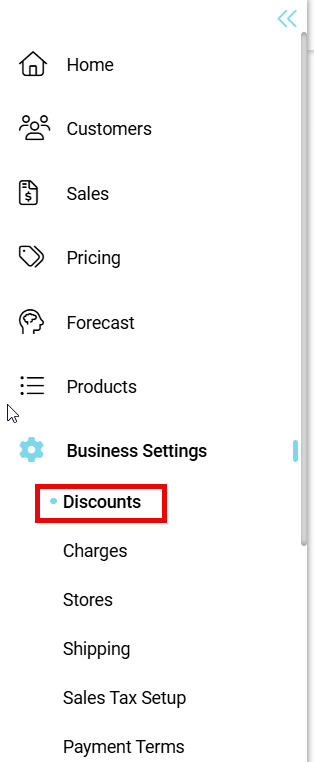
- Go to Administration
- Click on Business Settings
- Click on Discounts under Business Settings Action
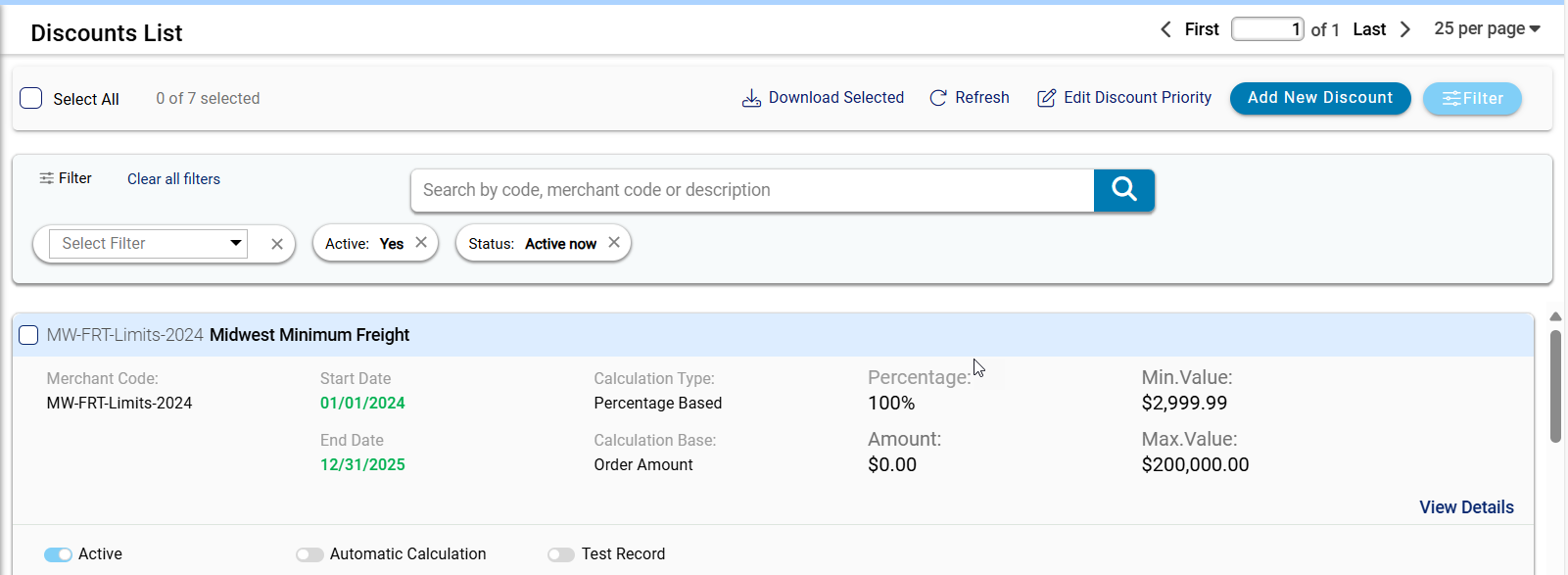
2. Key features of the Discount List tab

-
Select All Checkbox: This checkbox allows users to select or deselect all available discounts in the list. When checked, all discounts on the current page are marked for bulk actions such as downloading or modifying priority. If left unchecked, users can manually select individual discounts as needed.
-
Download Selected: This button provides an option to download details of the selected discounts. Users must select at least one discount for this action to be available. The download format depends on system configurations, typically generating a structured file such as JSON or Excel for reporting and analysis.
-
Refresh: The refresh button updates the displayed discount list to reflect the latest system changes. Clicking this option reloads the page and fetches the most recent data, ensuring that any modifications, additions, or deletions are visible.
-
Edit Discount Priority: This button allows users to modify the priority order of discounts, determining how they are applied when multiple discounts are available.
-
Add New Discount: This button initiates the process of creating a new discount entry in the system. Clicking it redirects users to a discount setup form, where they can define parameters such as discount type, value, applicability, and validity period.
3. Discount Overview:

-
Discount Code: Represents the system-assigned or manually entered identifier for the discount, ensuring proper tracking and reference.
-
Short Description: Provides a brief summary of the discount's purpose or application, helping users quickly understand its function.
-
Merchant Code: Specifies the associated merchant or system-generated reference code for the discount, ensuring correct categorization.
-
Start Date: Defines the activation date from which the discount becomes applicable to eligible transactions.
-
End Date: Specifies the final date when the discount expires and when it is no longer applicable.
-
Calculation Type: Determines whether the discount is calculated as a percentage reduction or a fixed amount deduction.
-
Calculation Base: Defines the basis for discount computation, such as order amount, product quantity, or shipping charges.
-
Percentage: Indicates the rate at which the discount is applied when percentage-based calculations are selected.
-
Amount: Displays the fixed value of the discount when amount-based calculations are used instead of percentage-based.
-
Minimum Value: Specifies the lowest order or product value required for the discount to be applied.
-
Maximum Value: Sets the highest order or product value limit for which the discount remains valid.
-
View Details: Provides access to additional configurations or detailed settings for the selected discount.
-
Active Toggle: Controls whether the discount is enabled or disabled for use in transactions.
-
Automatic Calculation Toggle: Determines whether the discount is applied automatically based on predefined conditions.
-
Test Record Toggle: Identifies whether the discount is in a testing phase, preventing it from affecting live transactions.

-
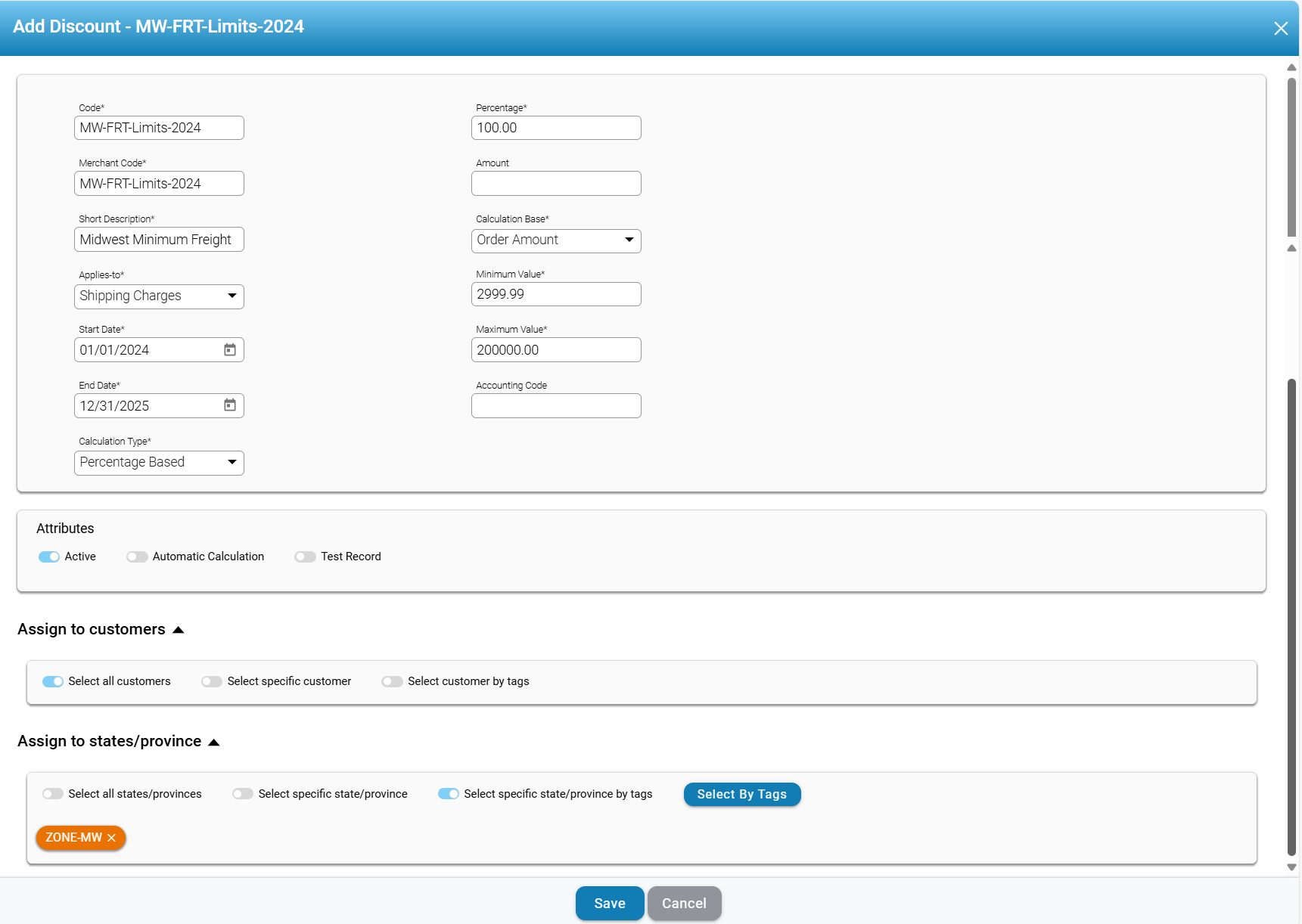
Code: This field represents the identifier used for internal reference and discount tracking. It must be entered manually or generated based on a predefined naming convention. The value entered should be consistent with other discount codes in the system to ensure seamless integration.
-
Merchant Code: This field indicates the merchant-specific reference code linked to the discount. It is commonly used in multi-merchant platforms where different vendors have unique discount structures. The merchant code helps differentiate discounts across various businesses or business units, ensuring the discount is applied only to transactions relevant to the designated merchant.
-
Short Description: This section summarizes the discount, helping users understand its purpose. The description should be clear, concise, and accurately reflect the discount's function.
-
Applies-To:
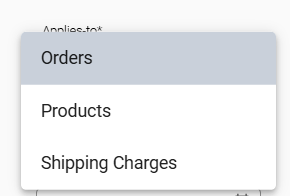
This dropdown defines the category of transactions where the discount will be applied. The available options include "Orders," "Products," and "Shipping Charges." Selecting "Orders" applies the discount based on the total order amount, while "Products" applies it based on product quantity. If "Shipping Charges" is selected, the discount is applied to shipping fees based on the order amount. The correct selection ensures the discount aligns with business rules and pricing strategies.
- Start Date: This field specifies the activation date from which the discount will be available. Users must enter a valid date within the system’s allowed range to ensure accurate scheduling. The discount will not apply to transactions made before this date, even if the criteria are met.
-
End Date: This field indicates the expiry date after which the discount will no longer be applicable. Once this date is reached, the discount will be automatically deactivated to ensure it is not used beyond the intended promotional period.
- Calculation Type: This field determines the method used to compute the discount, defining how the reduction is applied to the selected transaction category. The available options typically include percentage-based and amount-based discounts.
- Percentage-Based: This discount is calculated as a percentage of the eligible value, adjusting dynamically based on the transaction amount.
- If applied to Orders, the discount is a percentage of the total order amount.
- If applied to Products, it is a percentage of the product price or total product cost.
- If applied to Shipping Charges, it reduces a percentage of the shipping cost based on the order amount.
- Amount-Based: This discount applies a fixed monetary reduction, regardless of the total transaction value or quantity.
- If used for Orders, a fixed amount is deducted from the total order amount.
- For Products, it reduces a fixed amount per product or across selected items.
- When applied to Shipping Charges, it deducts a specific amount from the shipping fee based on the order total.
-
-
Percentage: This field represents the discount rate applied when the calculation type is percentage-based. Users must enter a numerical value, ensuring it does not exceed system-defined limits. The percentage discount is calculated dynamically based on the order amount or applicable charges.
-
Amount: This field is used when the calculation type is set to amount-based. The entered value determines the absolute reduction applied to the eligible transaction. Users must ensure that the amount does not exceed the minimum or maximum allowable discount limits. This field remains inactive when percentage-based discounts are selected.
-
Calculation Base: This field determines how the discount is computed, depending on the selection in the "Applies-To" field. If "Orders" is selected, the calculation is based on the total order amount. When "Products" is chosen, the discount is calculated based on product quantity, allowing volume-based discounts. For "Shipping Charges," the discount is calculated based on the order amount, ensuring that shipping discounts align with purchase values.
-
Minimum Value: This field specifies the lowest transaction amount required for the discount to be applied. Users must enter a value ensuring that only qualifying orders receive the discount. This field defines the minimum transaction amount or quantity required to apply the discount. For "Orders" and "Shipping Charges," the minimum value is based on the order amount, ensuring discounts only apply to purchases above a specific total. When "Products" is selected, the minimum value refers to product quantity, meaning a customer must purchase a certain number of items to qualify for the discount. This field prevents discounts from being applied to transactions that do not meet profitability thresholds.
-
Maximum Value: This field defines the highest transaction amount for which the discount is applicable. Transactions exceeding this value will not receive the discount. This field sets the upper limit of the transaction amount or quantity eligible for the discount. For "Orders" and "Shipping Charges," the maximum value is based on the order amount, ensuring discounts apply only within a controlled range. When "Products" is selected, the maximum value refers to product quantity, limiting the discount to a predefined number of items. This restriction prevents excessive discounts that could impact business profitability. Setting a reasonable maximum value helps maintain financial balance while ensuring the discount remains effective within the intended limits.
-
Accounting Code: ?????????
-
Attributes Section: This section offers additional configuration options, including toggles for "Active," "Automatic Calculation," and "Test Record." The "Active" toggle indicates whether the discount is currently in effect, while the "Automatic Calculation" option enables the system to apply the discount automatically, without needing manual input. The "Test Record" option specifies whether the discount is being used for testing purposes rather than actual transactions.
-
Assign to Customers: This section allows users to specify which customers are eligible for the discount. Users can select all customers, a specific customer, or categorize customers based on tags. Proper selection ensures that only authorized customers receive the discount, preventing unintended applications.
-
Assign to States/Provinces: This field is applicable only when "Shipping Charges" is selected in the "Applies-To" field. It allows users to restrict the discount based on geographic regions, ensuring that shipping-related discounts apply only to selected states or provinces. Users can apply the discount across all locations, select specific states/provinces, or use tags to categorize regions. This configuration helps businesses manage regional promotions and control shipping cost reductions based on location.
-
Save and Cancel Buttons: The "Save" button finalizes the discount configuration, applying all specified settings. The "Cancel" button discards changes, allowing users to exit without applying modifications.

Comments
0 comments
Please sign in to leave a comment.